Jazyk /ˈjazɪk/
English as a programming language.
A compiler that turns documentation → requirements → acceptance criteria → architecture → design → source code → tests. Every requirement gets a test.
An edit to the docs trickles down to the code, including migration, deployment, and rollback. A problem downstream trickles up to the docs as a warning or an error: a hole, an ambiguity, a contradiction.
Open the docs in an IDE. Each sentence links to its requirement, design, code, and tests. Warnings and errors show inline. The compiler runs on your own coding AI.
Example
A sort utility. Two documents in, one program and its tests out.
1. Docs
docs/main.js.md, written by hand.
# Main.ts

This is a simple sorting algorithm CLI utility similar to the `sort` CLI command.

## CLI args

When invoked, `sort` allows the following CLI args:
- `-r` reverses sorting order to descending

## Execution

Read CLI arguments, keep track of:
- Reverse order with `-r`
Read in from STDIN line by line:
    For current line, strip out whitespace before and after
    If stripped line is empty string, continue to next line
    Add stripped line to lines
Sort lines ascending. Or descending if reverse order
Print all sorted lines delimited by newline
2. Requirements and acceptance criteria
One requirement per obligation, each with the sentence it came from. Under each, the criteria: one condition, one outcome, concrete values.
req:main-js-3
-r CLI arg, which reverses the sorting order to descending.- `-r` reverses sorting order to descendingcrit:main-js-1
a, c, b on STDIN, sort -r prints c, b, a.crit:main-js-2
a, c, b on STDIN and no -r, sort prints a, b, c.req:main-js-8
If stripped line is empty string, continue to next linecrit:main-js-3
b, an empty line, a line of three spaces, and a on STDIN, sort prints a, b.crit:main-js-4
sort prints nothing.3. Architecture
Diagrams rendered from the graph. The sort utility is one box, so these are from the ledger example, a shop across four documents: the top level, the classes under Checkout, and the Checkout flow. Every arrow is a sentence.
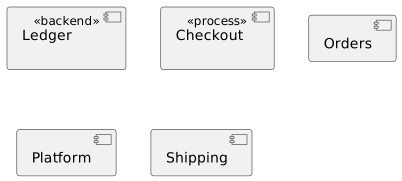
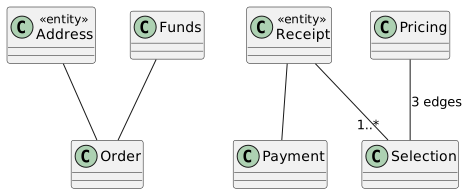
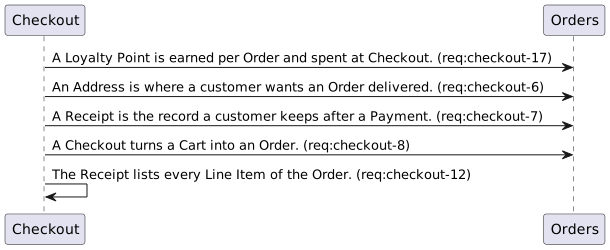
4. Tests
code/test/main.test.js, generated. Each test is named for the requirement it covers and asserts its criteria.
test('req_main_js_5_d8e51eea', () => {
  // -r reverses sorting order to descending.
  assert.strictEqual(runCli(['-r'], 'a\nc\nb\n'), 'c\nb\na\n');
});

test('req_main_js_16_6c7e91df', () => {
  // Default sort order (no -r) is ascending.
  assert.strictEqual(runCli([], 'c\na\nb\n'), 'a\nb\nc\n');
  assert.deepStrictEqual(sortLines(['c', 'a', 'b'], false), ['a', 'b', 'c']);
});

test('req_main_js_11_2fea0114', () => {
  // Lines that are empty after stripping are skipped.
  assert.strictEqual(runCli([], 'b\n\n   \n\t\na\n'), 'a\nb\n');
});

test('req_main_js_12_881a9320', () => {
  // Every non-empty stripped line is added to the accumulated lines.
  assert.deepStrictEqual(processRawLines([' x ', '', 'y', '   ']), ['x', 'y']);
});
5. Code
code/main.js, generated.
#!/usr/bin/env node
'use strict';

function parseArgs(argv) {
  const reverse = argv.includes('-r');
  return { reverse };
}

function processRawLines(rawLines) {
  const lines = [];
  for (const rawLine of rawLines) {
    const stripped = rawLine.trim();
    if (stripped === '') continue;
    lines.push(stripped);
  }
  return lines;
}

function sortLines(lines, reverse) {
  const sorted = lines.slice().sort();
  if (reverse) sorted.reverse();
  return sorted;
}

function printLines(lines, out) {
  out.write(lines.join('\n') + (lines.length > 0 ? '\n' : ''));
}

async function main() {
  const { reverse } = parseArgs(process.argv.slice(2));
  const lines = await readStdinLines(process.stdin);
  printLines(sortLines(lines, reverse), process.stdout);
}
Try it
The editor runs in the browser. Open one of the demo projects, or a folder on your computer with a jazyk.toml in it, and read the documents, the requirements, the diagrams, and the diagnostics compiled from them.